Hands On with the Asus Eee Top

My initial impression of the Verizon Hub wasn’t entirely positive – I’d rather have a touchscreen Eee Top in my kitchen. –DZ, 02/09

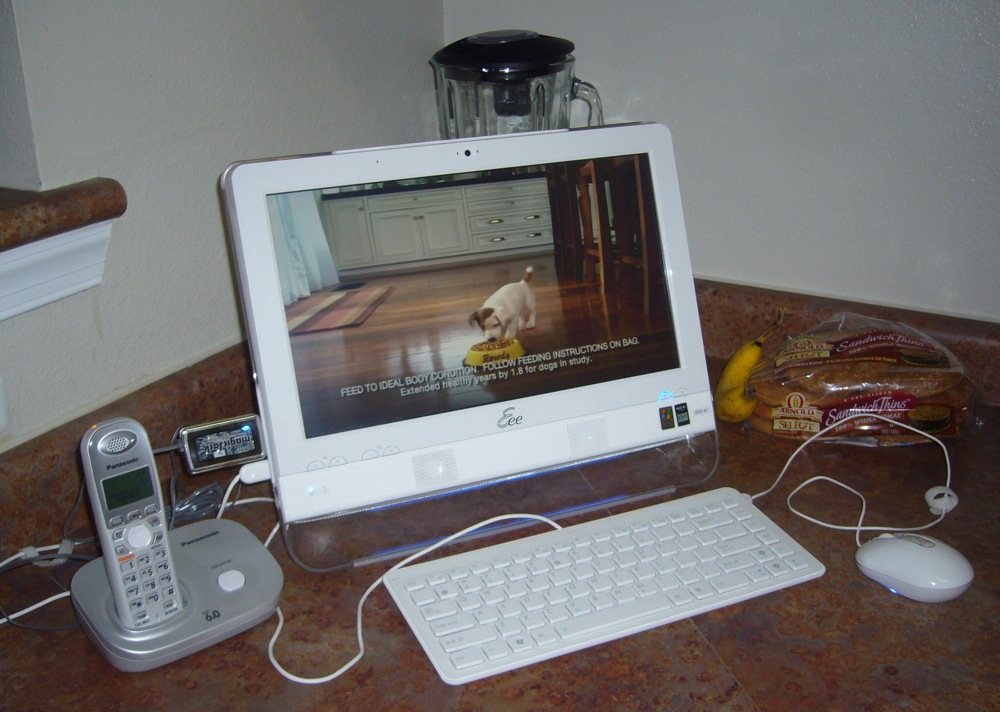
Given my pre-release proclamation above and after catching Brad Linder’s (Lilliputing) ASUS Eee Top ETP1602 review, I had to get my hands on a unit. Fortunately, Brad (and ASUS) were quite accommodating and I’ve been playing with his very same review loaner the last couple weeks. Whereas Brad dropped the Eee Top (~$500) in his office, being a fan (conceptually) of the Audrey and Icebox computing appliances of lore, I placed the 15.6″ all-in-one PC in our kitchen. Where I believe it belongs.

First off, while definitely plasticy, the Eee looks pretty sharp. Minus the cable clutter. My phone related paraphernalia could easily be cleaned up, but I positioned it front and center (well, off to the left) to demonstrate connectivity. Unfortunately, the wired keyboard and mouse would require an additional investment to free yourself of cables. In fact, if we’re counting pennies, I’d prefer ASUS provide wireless interfaces over the touchscreen – which I found myself rarely using. (Perhaps compounded by the review unit not shipping with its bundled stylus.) I appreciated the volume and brightness controls located on the bezel, in addition to the screen blanking button. And the Eee Top rear, which Brad photographed, features a simple yet effective, adjustable kickstand and various ports.

The custom apps (i.e. Eee Easy Mode) and third party software (i.e. Cyberlink media shell) that Brad felt made the Eee Top stand out, were mostly a distraction for me. (But are perfectly suitable for non-techies and children.) Thus, they were banished in relatively short order. Windows XP has been around for eons and I’m comfortable mousing around the UI as designed. To meet my widget needs, I installed all of Google Desktop. For telephonic capabilities, I plugged in the magicJack ($40, free US calling the first year) on a side USB port. (Although Skype would also work well, given the built-in microphone and video camera.) I had hoped the ETP1602 would made a great web-based kitchen television, but the video capabilities are a mixed bag…
Read more

Digital Media Bytes

A periodic roundup of relevant news… from our other blogs: Top Cablecos to Debut Online On-Demand Shows In recognition of the need to bridge the gap to the Internet, both Comcast and Time Warner Cable have now said they will make select programming available online to TV subscribers in the second half of this year. … Read more

DISH’s (Slingified) Online Scheduling Launches

DISH has joined other DVR vendors (DirecTV, Verizon, TiVo, Moxi) by (officially) launching online scheduling. While TiVo was a pioneer in this space, they’ve begun to lag as others provide a direct connection for interactive conflict resolution and to view listings of recorded shows or scheduled recordings. As DISH now offers broadband-connected ViP 612, ViP … Read more

Two-Year Cable TV Encryption Hiatus?

Each time I pick up ScreenPlays Magazine I’m reminded to read it more often. The reporting staff often go deeper than many folks in the broadband industry – digging up fantastic little nuggets that, unfortunately, seem to get passed over by the broader industry and mainstream technology press. In the April issue (PDF), Fred Dawson … Read more

TiVo Offers $200AUD Home Networking Down Under

tivo-home-networking

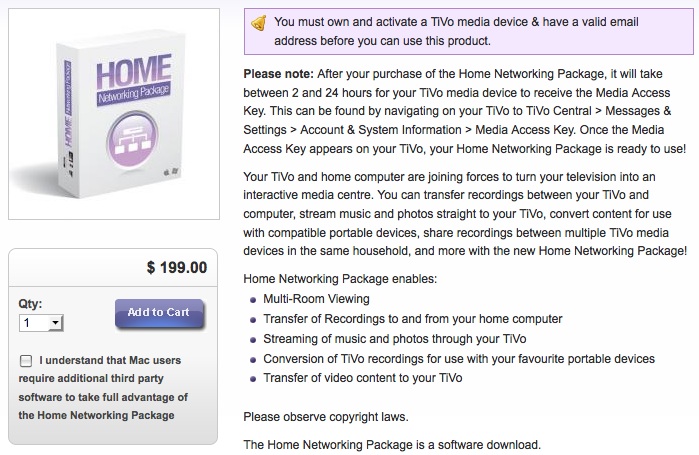
Filed under ‘those who forget the past are condemned to repeat it’, TiVo and Seven are repeating history Down Under. The recently introduced Australian Home Networking Package runs $200 AUD (~$150 USD) and enables TiVoToGo, Photo & Music sharing from PC, multi-room viewing, and provides the TiVo Desktop Plus software for video transcoding. Ozzie TiVo HD clock in at $699 AUD, with 7 day over-the-air (Freeview) EPG and no fees. So a motivated customer who buys two TiVos would be “rewarded” with a $150 fee if they’d like to transfer shows between units as we freely do in the US.

TiVo’s been down this path before here in the US… In the early Series2 days, expanded DVR options, such as multi-room viewing and PC photo streaming, were upsold as the TiVo Home Media Option (HMO) for a flat $99. Given TiVo owners are already paying a hardware premium, at some point the company wisely dropped that fee to market these features as a value-add.

It’s probably obvious where I stand on this business model. But I don’t claim to be an expert on the Australian television marketplace. And there’s a variety of financial considerations at play as Seven discusses in their surprisingly frank and interesting pricing FAQ:

TiVo in Australia is not owned by TiVo Inc in America. Hybrid TV is the licensee for the TiVo service in Australia and in exchange for that right – we pay TiVo a license fee on everything we sell and we often also have to pay 3rd party license fees for the Australian region. Obviously in America TiVo does not pay itself a royalty so their price is lower. These license fees add to the cost of our products here in Australia. This is a normal business arrangement between any licensee and licensor – nothing unusual.

Read more

ZNF ‘Round The Web

Leaving comments across the blogosphere… Why Does Photo Sharing Still Suck? Yep, I agree. Still looking for that perfect solution. And still pissed at Kodak for deleting my Galleries when I didn’t make a purchase. PS SmugSmug has a backup solution which uses Amazon’s cloud storage/server farm for an extra fee. They’ll even mail you … Read more

Digital Media Bytes: Last100 Edition

A periodic roundup of relevant news… from our friends at Last100: Flip Mino HD “point and shoot” camcorder review One of the selling points of the Mino HD is that software is included on the camera itself to enable basic editing and upload to various online destinations. Called FlipShare, the application runs of both Macs … Read more

A Non-Geek Look at Moxi’s HD DVR

I’m still getting familiar with my loaner retail Moxi HD DVR ($800, no fees). The Moxi UI is high def lusciousness and it offers some compelling features beyond requisite DVR functionality – such as the ticker, media streaming, and web browsing (!). And not an ad in sight. However… The interface does take a bit … Read more