The TiVo Schwag Giveaway

I realize I’ve been a bit critical of TiVo lately and they’ve got a fine, new retail competitor in Moxi. But we want TiVo fans to know ZNF still has love for you. This TiVo schwag prize package I’ve collected over the last couple months consists of a window cling 3-pack for your car(s), a … Read more

What Exactly is Wolfram Alpha?

We’ve seen a decent amount of hype the last few weeks surrounding the launch of Wolfram Alpha, with premises of ‘search engine evolution’ and ‘Google killer’ tossed about. But I admit that I haven’t been paying very close attention – Google meets most of my search engine needs, the last big launch (Cuil) failed to … Read more

Digital Media Bytes: Last100 Edition

A periodic roundup of relevant news… from our friends at Last100: A glimpse into the Nokia N97’s Facebook app With just a few weeks before the N97 is set to debut, Nokia have published an interactive demo of the phone’s User Interface, including a walk-through of some of the features of the included Facebook application. … Read more

Meta-Blogging: The Fine Art of Outreach

We continue to receive as many questions on blogging and blogger outreach as we do on tech, so I wanted to share an unedited email (other than the removal of line breaks) we received from PR firm A & R Edelman yesterday: Hi Dave, I saw this morning’s posting by Mari Silbey about “Adobe’s Launch … Read more

ZNF ‘Round The Web

Leaving comments across the blogosphere…

Twitterrific Comes Roaring Back Into The iPhone Twitter App Wars
As someone who paid $10 for the original, I’m glad the upgrade was free. But they may have introduced extra complexity and reduced usability in how they implemented the expanded feature set. I’m a bit torn between it and Tweetie. Wish I could pick and choose features (and performance) from the two to design the perfect client for me. I’ll continue to play with it a few more days, see if it grows on me and as I get more familiar with the UI.

MiFi is a mobile broadband game changer
Two questions: 1. ) Does Verizon show you your data usage in your online account? Since they’re charging overages, I’d want to keep tabs on bits transferred. 2.) Can you recharge this via USB? 2a.) Does it come with a car charger? Seriously considering swapping my Sprint aircard and Cradlepoint router for just one device. Could be overkill most of the time, but less overall clutter when on the road. Keeping it charged is my only concern.

More about TiVoToGo & Multi-Room Viewing Copy Protection (CCI byte Explained)
Except all the Series2 units don’t use CableCARDs and are not subject to Cable Labs. I think I recall Pony mentioning some sort of Macrovision flagging as well. Of course, the rational was a bit odd. I believe the context was since they provide Series2 units with DVD drives they were bound by Macrovision regulations. But it seems to me they didn’t have to adopt it across the board. I think it’s just as likely they did it that way to keep the content industry at bay. Who knows!

CableCARDs: Cause for Joy, and Pain
Some factual errors and omissions here… CableCARDs are NOT tuners, they are separable security devices. Multristream cards (M-Cards) support dual (or more) hardware tuners/tuning. Also the fees are all over the board. My 3 CableCARDs were installed free and some franchises don’t require truck rolls, though many (most?) do. Additionally, card rate varies. I think Comcast’s official policy in my area is the first card is free and additional cards are $1.50/mo which may or may not come with an ‘additional outlet’ (AO) fee. However, all three of my cards are free ‘rentals’ and I’m not charged outlet fees.

In addition to consumer confusion or ignorance, CableCARDs used in current retail boxes do not provide two-way services like video on demand (VOD) or handling switched digital video (SDV). However, the future (perhaps) lies in tru2way – a common platform to enable that. However it may also require you get stuck with the crappy cableco UI on your third party device, like HDTV. And you mention things dying out, yet tru2way is just getting rolling… and all the major cable-cos and many CE vendors have signed on.

Lastly, there was a move afoot to meet the FCC’s separable security mandate via software, rather than hardware pairing/authentication. Not sure where that stands.
Read more

iPhone Slingbox Client Arrives: WiFi Only, $30

Channeling Dave’s Twitter feed here on ZNF… Looks like the Slingbox iPhone embargo has been broken. Yes, Apple (& maybe AT&T) had it neutered. WiFi streaming only. $30, get it tmrw. I’ve been running the pre-release SlingPlayer for a month or so now. Will blog more thoughts in the AM. One more thing – Sling … Read more

Digital Media Bytes: Last100 Edition

A periodic roundup of relevant news… from our friends at Last100: Vudu to power telcos’ pay-per-view IPTV offerings Rather than punting the online video store via its own hardware alone, Vudu announced plans to “piggyback” third-party devices, including Internet-connected TVs, DVD players and other kinds of set-top boxes. And the first of those partnerships is … Read more

Hands On with the Asus Eee Top

My initial impression of the Verizon Hub wasn’t entirely positive – I’d rather have a touchscreen Eee Top in my kitchen. –DZ, 02/09

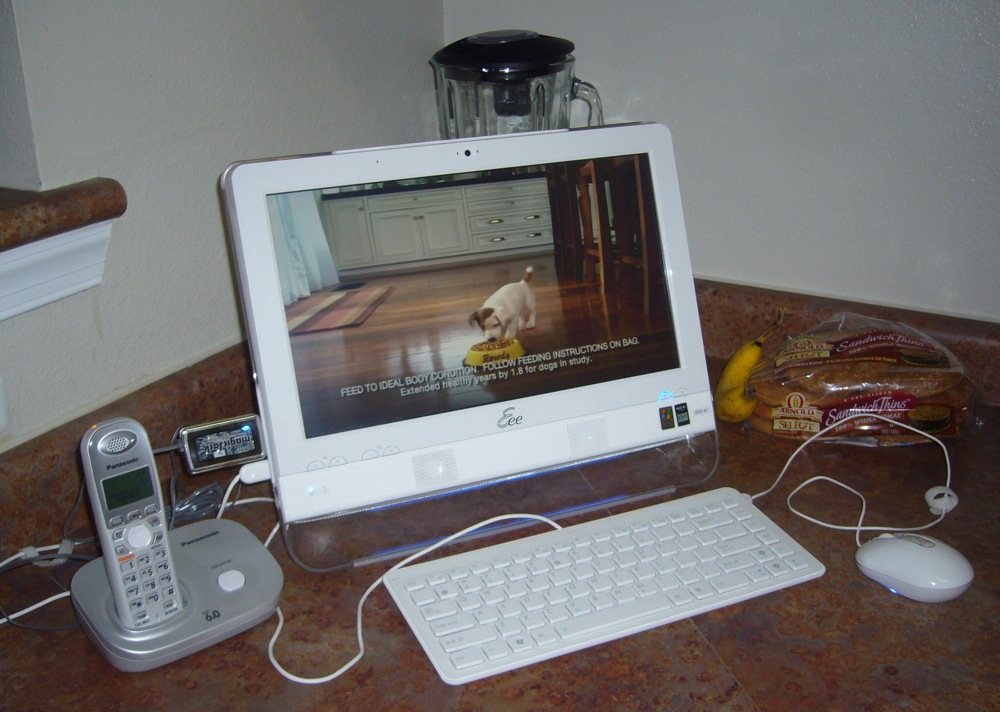
Given my pre-release proclamation above and after catching Brad Linder’s (Lilliputing) ASUS Eee Top ETP1602 review, I had to get my hands on a unit. Fortunately, Brad (and ASUS) were quite accommodating and I’ve been playing with his very same review loaner the last couple weeks. Whereas Brad dropped the Eee Top (~$500) in his office, being a fan (conceptually) of the Audrey and Icebox computing appliances of lore, I placed the 15.6″ all-in-one PC in our kitchen. Where I believe it belongs.

First off, while definitely plasticy, the Eee looks pretty sharp. Minus the cable clutter. My phone related paraphernalia could easily be cleaned up, but I positioned it front and center (well, off to the left) to demonstrate connectivity. Unfortunately, the wired keyboard and mouse would require an additional investment to free yourself of cables. In fact, if we’re counting pennies, I’d prefer ASUS provide wireless interfaces over the touchscreen – which I found myself rarely using. (Perhaps compounded by the review unit not shipping with its bundled stylus.) I appreciated the volume and brightness controls located on the bezel, in addition to the screen blanking button. And the Eee Top rear, which Brad photographed, features a simple yet effective, adjustable kickstand and various ports.

The custom apps (i.e. Eee Easy Mode) and third party software (i.e. Cyberlink media shell) that Brad felt made the Eee Top stand out, were mostly a distraction for me. (But are perfectly suitable for non-techies and children.) Thus, they were banished in relatively short order. Windows XP has been around for eons and I’m comfortable mousing around the UI as designed. To meet my widget needs, I installed all of Google Desktop. For telephonic capabilities, I plugged in the magicJack ($40, free US calling the first year) on a side USB port. (Although Skype would also work well, given the built-in microphone and video camera.) I had hoped the ETP1602 would made a great web-based kitchen television, but the video capabilities are a mixed bag…

Read more