My iPhone Is My Apple TV?

Like many of you, I took in Apple’s iPad 2 announcements today. As expected, given the rumormill, this iteration of the 10″ tablet clocks in with a thinner body that houses a faster processor and a pair of cameras. Not to mention a new option for Verizon 3G data services, although monthly pricing wasn’t disclosed. As part of the festivities, iOS 4.3 was also announced. And while AirPlay sees some improvement, I’m still not very impressed with its (in)ability to beam video to Apple TV hardware.

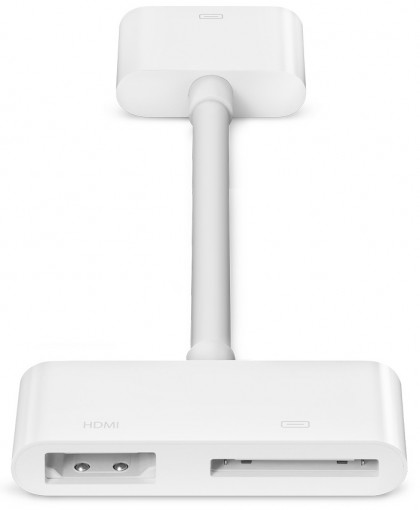
But Apple also happened to reveal a Digital AV Adapter this afternoon. This new dongle provides HDMI output, both audio and video (in addition to incorporating data/power pass-thru). Unlike the currently limited AirPlay and even official component cables, it’s a “true mirrored video output” that “works with all apps.” Meaning your iPhone (or iPad or iPod Touch) will immediately exceed just about every set-top box you own when it comes to online audio and video. Well, assuming you can deal with lower resolutions and no remote control.

Watching Netflix, Hulu, Adult Swim, The Onion, etc with an iPhone and this cable on a television may not be practical on a daily basis, but the possibilities are interesting. And, as small as my Apple TV and Roku are, I’d much rather travel with just one extra cable… and not have to worry about punching holes through a hotel’s firewall.

Update: True “mirroring” is only supported from the iPad 2 according to Apple’s fine print.
Read more

TiVo’s Priorities in 2011

TiVo held their quarterly call yesterday. Unfortunately, there wasn’t much in the way of technological specifics suited for a gadget blog such as ours. From where we’re sitting, it seems TiVo’s current focus is expanding their DVR business through MSO partnerships (Virgin, DirecTV, RCN, etc) and continued patent litigation. Interestingly, their R&D and legal budgets … Read more

Boxee Wants To Be Your DVR?

Boxee put out a funding press release yesterday, in what amounts to $16.5 million of fresh cash. These sorts of announcements don’t generally motivate us to write. While money’s always changing hands, and this seems like a notable bet on Internet video, we’re more interested in tangible products. But what caught my attention was this … Read more

DRM: Publishers Crippling Library eBooks

I’m not generally a fan of DRM, because so-called digital rights management software basically limits what users can do with the software, books, music, and movies they download. If you pay for an eBook or a movie you should really be able to access it on any device you choose, write in the margins, or … Read more

TiVo iPad App To Support Series 3 Hardware

The virtual remote news just keeps on coming… TiVo went ahead and updated their free iPad companion app yesterday. In addition the various bug fixes, better support for multiple DVRs, and background functionality, one user reports a noteworthy upgrade notice: This app currently requires a TiVo Premier Series 4 DVR. Support for RCN and Suddenlink Premier … Read more

Roku iPhone Remote Control App Updated

roku-iphone-remote

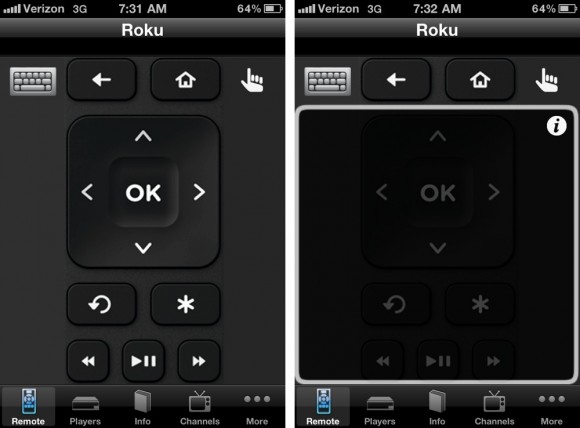
iOS remote week continues here at ZNF… As the very fine Roku DVPRemote ($3) was updated early this morning to version 2.1. I’ve been using the app for a few days via my Verizon iPhone (seeya, AT&T), and the two most notable new features are the full fledged gesture area and graphical channel icons.

While DVPRemote has always provided a virtual representation of Roku’s physical remote, the update provides a toggle-able gesture area (above, right) designed “to support heads-up, TV screen-facing operation.” I’m not quite sure if I’ll be putting this feature to use on a regular basis, but there’s a pretty comprehensive list of smooth interactions to choose from:

  • U = UP, D = Down, L = Left, R = Right
  • Single finger swipe U, D, L , R for U, D, L, R
  • Drag finger U, D, L, R for repeated U, D, L, R
  • Single finger tap to select OK
  • Two finger tap to select play/pause
  • Two finger swipe R for fast forward
  • Two finger swipe L for rewind
  • Two finger swipe D for instant replay
  • Two finger swipe U for info

One of my favorite features of DVPRemote is direct channel navigation. Meaning, instead of scrolling through a list of Roku channels on the television one by one, simply tap a visual representation from the iPhone to bring that content up. The first cut was textual. But DVPRemote 2.1 makes it much more visually rich by using channel banner graphics. Which also happens to be more efficient. However, for better use of space, I’d like to see a 2.2 update move to grid view of channels over the current vertical listing.

Read more

DirecTV iPad App Now Available

After a mere 5 day tease, DirecTV is out with their free Apple iPad app. DBSTalk has produced a multi-page overview, which you can peruse above, and also kindly provided the screengrabs below. Given its size, I find the iPad cumbersome as a full-time remote replacement. Yet, like TiVo’s iPad app, DirecTV has rounded out the … Read more

Revisiting The UFC on Roku

It’s been nearly a year since live UFC bouts landed on Roku ($60). And, I have to say, it’s a much better experience in 2011 than it was earlier in 2010. From my original coverage (of UFC 113):

Quality was good. But probably not good enough.

Roku is a company I regularly chat with and, at some point last year, they suggested I take another look at UFC as a number of presentation improvements have been made since launch. Our schedules, and coupon codes, finally lined up this weekend… and I took in UFC 127 live.

Whereas I found UFC 113’s stream inconsistant and not high enough resolution, UFC 127 was another story. Indeed, a much better story. When initially firing up the live stream, I found myself watching unpleasant smudgy SD video. But after maybe two minutes, I was automatically elevated to what looked like a HD tier. Which is where I remained for nearly the entirety of the matches. At one point, I seemed to drop back down for a minute and at another point it looked like I was hit with some dropped frames. But these minor glitches are acceptable given the 2+ hours of smooth streaming and nice looking video.

Of course, your mileage may vary. Unlike cable company pay-per-view, there are many more variables that may impact your experience by taking video over the top (OTT) – including one’s broadband package, ISP connectivity, and home network. Without a doubt, the cableco provides a safer bet. But for those who don’t have cable or want to travel with PPV events, Roku is a very solid option for UFC. (Or NHL and MLB.)

Read more