iPad in the House! What Works, What Doesn’t.

This is a gadget and digital media blog, so despite the fact that Apple iPad reviews have been done to death, I feel the need to weigh in with my own initial thoughts after a week with one in our household. My husband is the rightful owner of the new iPad, but he’s been gracious enough to let me spend some time with it.

First of all, there’s no adequate way to describe how well the iPad display works for photos and video. There just isn’t. If you’ve seen anything close up in 3D, it’s kind of like that. The screen isn’t really 3D, but it feels like there’s an extra layer of depth in high-resolution pics and flicks. Because of the touch screen, you also get to interact with photos – zooming in and out, moving pictures around. It’s nothing you can’t do on an iPhone or iPod touch, but the screen size improves the experience exponentially. And Netflix? Forget it. The iPad is a sure travel companion if you’re going anywhere with Wi-Fi. Even if it’s just upstairs to watch a movie in bed.

As good as the iPad display is, it’s a shame more apps don’t take advantage of it yet. Google Earth, for example, only runs at iPhone size, which is extremely disappointing on a 10″ screen. And when I tried out a couple of shopping sites, I was underwhelmed by product shots that seemed to be begging for high-res, 360-degree views. In the New York Times Editors’ Choice app, one enterprising watch manufacturer has claimed all of the apparent ad space with stunning, rich-media display ads. Unfortunately, no other companies have jumped on board, so the same inescapable ads are rotated endlessly. Photos from stories in the newspaper app are generally disappointing too. They certainly don’t live up to what the iPad can deliver.

Read more

Western Digital Debuts WD TV Live Plus with Netflix

Western Digital isn’t new to the digital media adapter/extender market, but the company is historically known more for its external hard drive products than its ambitions in the living-room entertainment wars. At least it was before today. This morning, Western Digital announced a new WD TV Live Plus HD Media player with full 1080p resolution and … Read more

Deal of the Day: Roku HD-XR @ $105

We’re big fans of Roku here at ZNF. In fact, the Soundbridge was one of my first streaming devices way back when. (Not to mention Mari and I have both been satisfied ReplayTV owners – a company also founded by Anthony Wood.) Of course, these days, Roku’s all about their small television-connected media player… which … Read more

I Don’t Need A Color Kindle

Even if Amazon’s got a Kindle 3 locked and loaded, it won’t be shipping with a color display. At a shareholder meeting today, Amazon CEO Jeff Bezos said that while he’s seen such technology “in the laboratory,” it’s “not ready for prime time production” and a color screen Kindle is “a long way out.” I’m perfectly … Read more

Hands On with the Kodak Pulse WiFi Frame

I got pretty excited about the Kodak Pulse digital picture frame back at CES, but didn’t have a chance for any one-on-one time with the product until last weekend. Who needs a review unit when your parents buy the gadget outright? And that in itself says a lot. After years of searching, we finally have … Read more

How Do You Hold Your iPad?

John Biggs Takes A Call One one the reasons we don’t own an iPad yet is because I haven’t quite figured out how to hold and/or position it. After playing with a number of units, I know it’s heavier than say a Kindle but lacks the built in stand that a laptop hinge provides. Apparently, … Read more

Tale of a New Netbook

My carefully laid plans to upgrade upgrade my netbook in June were foiled last week when my Eee 1000HA essentially bit the dust. Since I couldn’t wait for the Acer Aspire 532G and the Asus Eee Seashell 1005PR to ship, I fell back on three other options. The Acer Aspire AS1410 came highly recommended by many, … Read more

Hands on the Sony Dash (Widgety)

sony-dash9

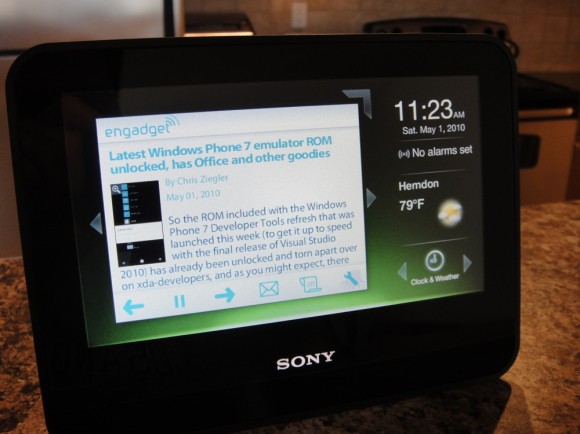
As I proclaimed (on camera) at CES earlier this year, 2010 ushers in a new category of media consumption devices. Something us geeks have dabbled with for ages, but the trend is finally making its way into the mainstream. And while I actually missed the Sony Dash at CES, it landed on my radar big time when Netflix streaming was announced in February.

Unlike the tablet-esque iPad or Nook, the now-shipping Sony Dash ($199) is more of a stationary Internet widget station that houses a 7″ capacitive touchscreen. Speaking of those widgets, the core app catalog is provided via a partnership with Chumby. But fortunately dispenses with the hacky sack look. The Dash features at least two default displays and Chumby widgets, added via the unit and/or configured via an online portal, are windowed – but can optionally also be expanded fullscreen. My preferred presentation, after about 24 hours of testing this loaner unit, is pictured above.
sony-dash10

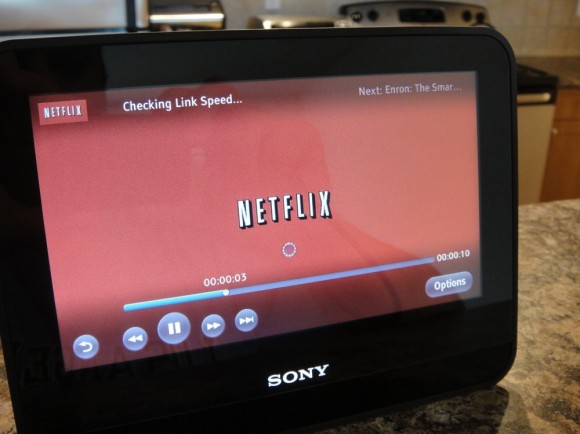
Beyond Chumby, Sony has impressively channeled their Bravia Internet Video platform — which includes the likes of Netflix, Pandora, YouTube, and Slacker. I briefly played with the Netflix app and was surprised at how good it looked when streaming an episode of Weeds. Of course, most of us won’t want to actually watch long-form content on a 7″ screen. Which is why one of my first stops was Slacker. That particular UI consist of grainy album art and lacks text labels, but once I got my account linked online, I was loving the Dash. Audio volume and quality are OK for a kitchen or bedroom. The speakers won’t blow anyone away, but they’re better than most laptops. Most impressively, and something an iPad can’t do (yet), is the ability to stream that Slacker audio in the background while say running the Chumby Twitter app.

Read more